 sysopsandClaude Sonnet 5
e5c0a5888f
sysopsandClaude Sonnet 5
e5c0a5888f
Upstream builds a single static binary (main.go at repo root, no
cmd/... subpackage) that go:embeds templates/ and assets/ at compile
time, and uses a relative ./db directory (jsondb) instead of SQLite -
so WorkingDirectory in the systemd unit now matters for the DB path,
not for template/static serving like before.

Frontend assets (admin-lte, jquery plugins) need yarn + prepare_assets.sh
before go build, so all installers now also install nodejs/npm/yarn and
run prepare_assets.sh when assets/dist is missing or package.json changed.

Binary is now literally named "wireguard-ui" (matches upstream), listens
on 0.0.0.0:5000 by default. systemd unit rewritten accordingly with
WorkingDirectory=/var/lib/wireguard-ui-multi.

Co-Authored-By: Claude Sonnet 5 <noreply@anthropic.com>
300 lines
21 KiB
Markdown
300 lines
21 KiB
Markdown

|
|
|
|
# wireguard-ui-multi
|
|
|
|
Fork von [ngoduykhanh/wireguard-ui](https://github.com/ngoduykhanh/wireguard-ui),
|
|
Basis für eine native Multi-Server-Erweiterung (siehe `CLAUDE.md`). Läuft ohne
|
|
Docker direkt als systemd-Service.
|
|
|
|
## Schnellinstallation (Einzeiler)
|
|
|
|
Auf einem frischen Debian/Ubuntu-Host (als root):
|
|
|
|
```bash
|
|
curl -fsSL https://gitea.perlbach24.de/scripte/wireguard-ui-multi/raw/branch/main/bootstrap.sh | bash
|
|
```
|
|
|
|
Installiert Abhängigkeiten (Go, Node/yarn, wireguard-tools, nftables), baut
|
|
Frontend-Assets + Binary, installiert nach `/usr/local/bin/wireguard-ui` und
|
|
richtet den systemd-Service `wireguard-ui-multi.service` ein (nicht
|
|
automatisch gestartet). Danach:
|
|
|
|
```bash
|
|
sudo systemctl enable --now wireguard-ui-multi.service
|
|
```
|
|
|
|
UI standardmäßig unter `http://<host>:5000` erreichbar. Default-Login
|
|
`admin`/`admin` — sofort ändern.
|
|
|
|
### Hardware-Anforderungen
|
|
|
|
- Betrieb: 1 vCPU, 128-256 MB RAM reichen (reines Go-Binary, JSON-Dateidatenbank)
|
|
- Build aus Quellcode: Go-Toolchain + Node/yarn (Frontend-Assets), kein cgo/SQLite
|
|
mehr nötig, daher deutlich genügsamer als frühere from-scratch-Version
|
|
|
|
### Update
|
|
|
|
```bash
|
|
cd /opt/wireguard-ui-multi-src
|
|
sudo ./update.sh
|
|
```
|
|
|
|
Holt neuesten Code, baut Frontend-Assets neu (falls `package.json` sich
|
|
geändert hat) und Binary, installiert neu, startet den Dienst neu.
|
|
|
|
### Proxmox LXC
|
|
|
|
```bash
|
|
sudo ./scripts/proxmox-install.sh --vmid 200 --hostname wireguard-ui-multi
|
|
```
|
|
|
|
Legt privilegierten LXC an (CAP_NET_ADMIN + `/dev/net/tun` Passthrough nötig
|
|
für WireGuard), installiert alles hinein.
|
|
|
|
---
|
|
|
|
# wireguard-ui (Original-Upstream-Dokumentation)
|
|
|
|
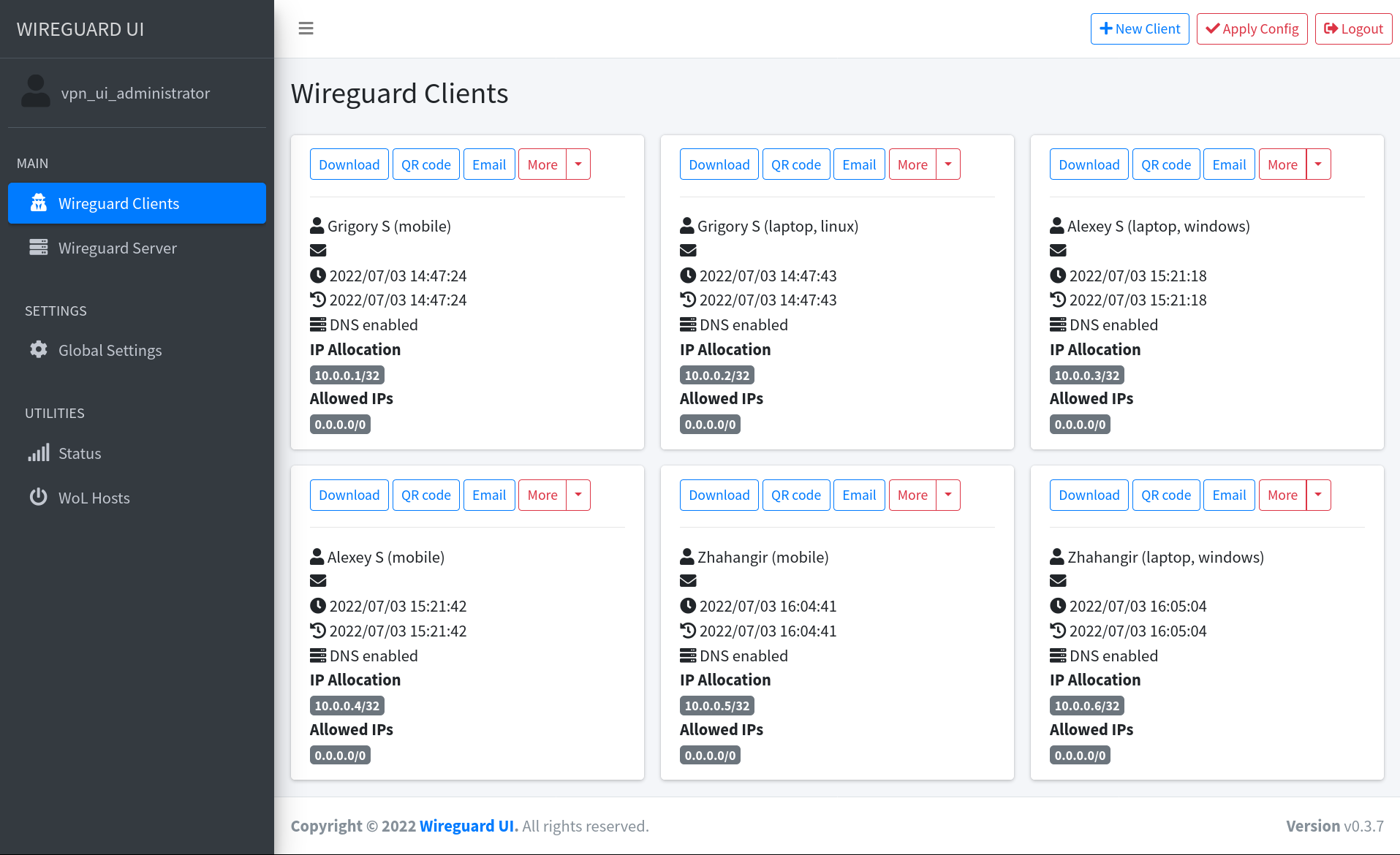
A web user interface to manage your WireGuard setup.
|
|
|
|
## Features
|
|
|
|
- Friendly UI
|
|
- Authentication
|
|
- Manage extra client information (name, email, etc.)
|
|
- Retrieve client config using QR code / file / email / Telegram
|
|
|
|
|
|
|
|
## Run WireGuard-UI
|
|
|
|
> ⚠️The default username and password are `admin`. Please change it to secure your setup.
|
|
|
|
### Using binary file
|
|
|
|
Download the binary file from the release page and run it directly on the host machine
|
|
|
|
```
|
|
./wireguard-ui
|
|
```
|
|
|
|
### Using docker compose
|
|
|
|
The [examples/docker-compose](examples/docker-compose) folder contains example docker-compose files.
|
|
Choose the example which fits you the most, adjust the configuration for your needs, then run it like below:
|
|
|
|
```
|
|
docker-compose up
|
|
```
|
|
|
|
## Environment Variables
|
|
|
|
| Variable | Description | Default |
|
|
|-------------------------------|-------------------------------------------------------------------------------------------------------------------------------------------------------------------------------------------------------------------------------------------------------------------------------------|------------------------------------|
|
|
| `BASE_PATH` | Set this variable if you run wireguard-ui under a subpath of your reverse proxy virtual host (e.g. /wireguard) | N/A |
|
|
| `BIND_ADDRESS` | The addresses that can access to the web interface and the port, use unix:///abspath/to/file.socket for unix domain socket. | 0.0.0.0:80 |
|
|
| `SESSION_SECRET` | The secret key used to encrypt the session cookies. Set this to a random value | N/A |
|
|
| `SESSION_SECRET_FILE` | Optional filepath for the secret key used to encrypt the session cookies. Leave `SESSION_SECRET` blank to take effect | N/A |
|
|
| `SESSION_MAX_DURATION` | Max time in days a remembered session is refreshed and valid. Non-refreshed session is valid for 7 days max, regardless of this setting. | 90 |
|
|
| `SUBNET_RANGES` | The list of address subdivision ranges. Format: `SR Name:10.0.1.0/24; SR2:10.0.2.0/24,10.0.3.0/24` Each CIDR must be inside one of the server interfaces. | N/A |
|
|
| `WGUI_USERNAME` | The username for the login page. Used for db initialization only | `admin` |
|
|
| `WGUI_PASSWORD` | The password for the user on the login page. Will be hashed automatically. Used for db initialization only | `admin` |
|
|
| `WGUI_PASSWORD_FILE` | Optional filepath for the user login password. Will be hashed automatically. Used for db initialization only. Leave `WGUI_PASSWORD` blank to take effect | N/A |
|
|
| `WGUI_PASSWORD_HASH` | The password hash for the user on the login page. (alternative to `WGUI_PASSWORD`). Used for db initialization only | N/A |
|
|
| `WGUI_PASSWORD_HASH_FILE` | Optional filepath for the user login password hash. (alternative to `WGUI_PASSWORD_FILE`). Used for db initialization only. Leave `WGUI_PASSWORD_HASH` blank to take effect | N/A |
|
|
| `WGUI_ENDPOINT_ADDRESS` | The default endpoint address used in global settings where clients should connect to. The endpoint can contain a port as well, useful when you are listening internally on the `WGUI_SERVER_LISTEN_PORT` port, but you forward on another port (ex 9000). Ex: myvpn.dyndns.com:9000 | Resolved to your public ip address |
|
|
| `WGUI_FAVICON_FILE_PATH` | The file path used as website favicon | Embedded WireGuard logo |
|
|
| `WGUI_DNS` | The default DNS servers (comma-separated-list) used in the global settings | `1.1.1.1` |
|
|
| `WGUI_MTU` | The default MTU used in global settings | `1450` |
|
|
| `WGUI_PERSISTENT_KEEPALIVE` | The default persistent keepalive for WireGuard in global settings | `15` |
|
|
| `WGUI_FIREWALL_MARK` | The default WireGuard firewall mark | `0xca6c` (51820) |
|
|
| `WGUI_TABLE` | The default WireGuard table value settings | `auto` |
|
|
| `WGUI_CONFIG_FILE_PATH` | The default WireGuard config file path used in global settings | `/etc/wireguard/wg0.conf` |
|
|
| `WGUI_LOG_LEVEL` | The default log level. Possible values: `DEBUG`, `INFO`, `WARN`, `ERROR`, `OFF` | `INFO` |
|
|
| `WG_CONF_TEMPLATE` | The custom `wg.conf` config file template. Please refer to our [default template](https://github.com/ngoduykhanh/wireguard-ui/blob/master/templates/wg.conf) | N/A |
|
|
| `EMAIL_FROM_ADDRESS` | The sender email address | N/A |
|
|
| `EMAIL_FROM_NAME` | The sender name | `WireGuard UI` |
|
|
| `SENDGRID_API_KEY` | The SendGrid api key | N/A |
|
|
| `SENDGRID_API_KEY_FILE` | Optional filepath for the SendGrid api key. Leave `SENDGRID_API_KEY` blank to take effect | N/A |
|
|
| `SMTP_HOSTNAME` | The SMTP IP address or hostname | `127.0.0.1` |
|
|
| `SMTP_PORT` | The SMTP port | `25` |
|
|
| `SMTP_USERNAME` | The SMTP username | N/A |
|
|
| `SMTP_PASSWORD` | The SMTP user password | N/A |
|
|
| `SMTP_PASSWORD_FILE` | Optional filepath for the SMTP user password. Leave `SMTP_PASSWORD` blank to take effect | N/A |
|
|
| `SMTP_AUTH_TYPE` | The SMTP authentication type. Possible values: `PLAIN`, `LOGIN`, `NONE` | `NONE` |
|
|
| `SMTP_ENCRYPTION` | The encryption method. Possible values: `NONE`, `SSL`, `SSLTLS`, `TLS`, `STARTTLS` | `STARTTLS` |
|
|
| `SMTP_HELO` | Hostname to use for the HELO message. smtp-relay.gmail.com needs this set to anything but `localhost` | `localhost` |
|
|
| `TELEGRAM_TOKEN` | Telegram bot token for distributing configs to clients | N/A |
|
|
| `TELEGRAM_ALLOW_CONF_REQUEST` | Allow users to get configs from the bot by sending a message | `false` |
|
|
| `TELEGRAM_FLOOD_WAIT` | Time in minutes before the next conf request is processed | `60` |
|
|
|
|
### Defaults for server configuration
|
|
|
|
These environment variables are used to control the default server settings used when initializing the database.
|
|
|
|
| Variable | Description | Default |
|
|
|-----------------------------------|-----------------------------------------------------------------------------------------------|-----------------|
|
|
| `WGUI_SERVER_INTERFACE_ADDRESSES` | The default interface addresses (comma-separated-list) for the WireGuard server configuration | `10.252.1.0/24` |
|
|
| `WGUI_SERVER_LISTEN_PORT` | The default server listen port | `51820` |
|
|
| `WGUI_SERVER_POST_UP_SCRIPT` | The default server post-up script | N/A |
|
|
| `WGUI_SERVER_POST_DOWN_SCRIPT` | The default server post-down script | N/A |
|
|
|
|
### Defaults for new clients
|
|
|
|
These environment variables are used to set the defaults used in `New Client` dialog.
|
|
|
|
| Variable | Description | Default |
|
|
|---------------------------------------------|-------------------------------------------------------------------------------------------------|-------------|
|
|
| `WGUI_DEFAULT_CLIENT_ALLOWED_IPS` | Comma-separated-list of CIDRs for the `Allowed IPs` field. (default ) | `0.0.0.0/0` |
|
|
| `WGUI_DEFAULT_CLIENT_EXTRA_ALLOWED_IPS` | Comma-separated-list of CIDRs for the `Extra Allowed IPs` field. (default empty) | N/A |
|
|
| `WGUI_DEFAULT_CLIENT_USE_SERVER_DNS` | Boolean value [`0`, `f`, `F`, `false`, `False`, `FALSE`, `1`, `t`, `T`, `true`, `True`, `TRUE`] | `true` |
|
|
| `WGUI_DEFAULT_CLIENT_ENABLE_AFTER_CREATION` | Boolean value [`0`, `f`, `F`, `false`, `False`, `FALSE`, `1`, `t`, `T`, `true`, `True`, `TRUE`] | `true` |
|
|
|
|
### Docker only
|
|
|
|
These environment variables only apply to the docker container.
|
|
|
|
| Variable | Description | Default |
|
|
|-----------------------|---------------------------------------------------------------|---------|
|
|
| `WGUI_MANAGE_START` | Start/stop WireGuard when the container is started/stopped | `false` |
|
|
| `WGUI_MANAGE_RESTART` | Auto restart WireGuard when we Apply Config changes in the UI | `false` |
|
|
|
|
## Auto restart WireGuard daemon
|
|
|
|
WireGuard-UI only takes care of configuration generation. You can use systemd to watch for the changes and restart the
|
|
service. Following is an example:
|
|
|
|
### Using systemd
|
|
|
|
Create `/etc/systemd/system/wgui.service`
|
|
|
|
```bash
|
|
cd /etc/systemd/system/
|
|
cat << EOF > wgui.service
|
|
[Unit]
|
|
Description=Restart WireGuard
|
|
After=network.target
|
|
|
|
[Service]
|
|
Type=oneshot
|
|
ExecStart=/usr/bin/systemctl restart wg-quick@wg0.service
|
|
|
|
[Install]
|
|
RequiredBy=wgui.path
|
|
EOF
|
|
```
|
|
|
|
Create `/etc/systemd/system/wgui.path`
|
|
|
|
```bash
|
|
cd /etc/systemd/system/
|
|
cat << EOF > wgui.path
|
|
[Unit]
|
|
Description=Watch /etc/wireguard/wg0.conf for changes
|
|
|
|
[Path]
|
|
PathModified=/etc/wireguard/wg0.conf
|
|
|
|
[Install]
|
|
WantedBy=multi-user.target
|
|
EOF
|
|
```
|
|
|
|
Apply it
|
|
|
|
```sh
|
|
systemctl enable wgui.{path,service}
|
|
systemctl start wgui.{path,service}
|
|
```
|
|
|
|
### Using openrc
|
|
|
|
Create `/usr/local/bin/wgui` file and make it executable
|
|
|
|
```sh
|
|
cd /usr/local/bin/
|
|
cat << EOF > wgui
|
|
#!/bin/sh
|
|
wg-quick down wg0
|
|
wg-quick up wg0
|
|
EOF
|
|
chmod +x wgui
|
|
```
|
|
|
|
Create `/etc/init.d/wgui` file and make it executable
|
|
|
|
```sh
|
|
cd /etc/init.d/
|
|
cat << EOF > wgui
|
|
#!/sbin/openrc-run
|
|
|
|
command=/sbin/inotifyd
|
|
command_args="/usr/local/bin/wgui /etc/wireguard/wg0.conf:w"
|
|
pidfile=/run/${RC_SVCNAME}.pid
|
|
command_background=yes
|
|
EOF
|
|
chmod +x wgui
|
|
```
|
|
|
|
Apply it
|
|
|
|
```sh
|
|
rc-service wgui start
|
|
rc-update add wgui default
|
|
```
|
|
|
|
### Using Docker
|
|
|
|
Set `WGUI_MANAGE_RESTART=true` to manage Wireguard interface restarts.
|
|
Using `WGUI_MANAGE_START=true` can also replace the function of `wg-quick@wg0` service, to start Wireguard at boot, by
|
|
running the container with `restart: unless-stopped`. These settings can also pick up changes to Wireguard Config File
|
|
Path, after restarting the container. Please make sure you have `--cap-add=NET_ADMIN` in your container config to make
|
|
this feature work.
|
|
|
|
## Build
|
|
|
|
### Build docker image
|
|
|
|
Go to the project root directory and run the following command:
|
|
|
|
```sh
|
|
docker build --build-arg=GIT_COMMIT=$(git rev-parse --short HEAD) -t wireguard-ui .
|
|
```
|
|
|
|
or
|
|
|
|
```sh
|
|
docker compose build --build-arg=GIT_COMMIT=$(git rev-parse --short HEAD)
|
|
```
|
|
|
|
:information_source: A container image is available on [Docker Hub](https://hub.docker.com/r/ngoduykhanh/wireguard-ui)
|
|
which you can pull and use
|
|
|
|
```
|
|
docker pull ngoduykhanh/wireguard-ui
|
|
````
|
|
|
|
### Build binary file
|
|
|
|
Prepare the assets directory
|
|
|
|
```sh
|
|
./prepare_assets.sh
|
|
```
|
|
|
|
Then build your executable
|
|
|
|
```sh
|
|
go build -o wireguard-ui
|
|
```
|
|
|
|
## License
|
|
|
|
MIT. See [LICENSE](https://github.com/ngoduykhanh/wireguard-ui/blob/master/LICENSE).
|
|
|
|
## Support
|
|
|
|
If you like the project and want to support it, you can *buy me a coffee* ☕
|
|
|
|
<a href="https://www.buymeacoffee.com/khanhngo" target="_blank"><img src="https://cdn.buymeacoffee.com/buttons/default-orange.png" alt="Buy Me A Coffee" height="41" width="174"></a>
|