mirror of
https://github.com/jordanhillis/pvekclean.git
synced 2026-06-20 10:23:50 +02:00
 Jordan
88 lines
3.1 KiB
Markdown
88 lines
3.1 KiB
Markdown

|
|
|
|
Easily remove old/unused PVE kernels on your Proxmox VE system
|
|
|
|
[](https://travis-ci.org/jordanhillis/pvekclean)
|
|
[](https://opensource.org/licenses/MIT)
|
|
|
|
### What is PVE Kernel Cleaner?
|
|
|
|
PVE Kernel Cleaner is a program to compliment Proxmox Virtual Environment which is an open-source server virtualization environment. PVE Kernel Cleaner allows you to purge old/unused kernels filling the /boot directory. As new kernels are released the older ones have to be manually removed frequently to make room for newer ones. This can become quite tedious and require extensive time spent monitoring the system when new kernels are released and when older ones need to be cleared out to make room. With this issue existing, PVE Kernel Cleaner was created to solve it.
|
|
|
|
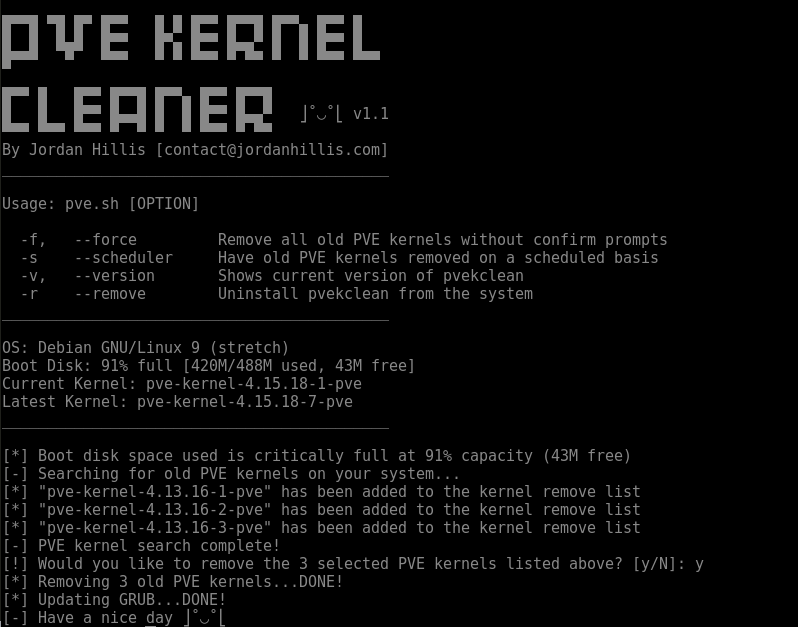
## Example Usage
|
|
|
|
|
|
|
|
## Features
|
|
|
|
* Removes old PVE kernels from your system
|
|
* Ability to schedule PVE kernels to automatically be removed on a daily/weekly/monthly basis
|
|
* Run a simple pvekclean command for ease of access
|
|
* Checks health of boot disk based on space available
|
|
* Debug mode for non-destructive testing
|
|
* Update function to easily update the program to the latest version
|
|
* Allows you to specify the minimum number of most recent PVE kernels to retain
|
|
* Support for the latest Proxmox versions and PVE kernels
|
|
|
|
## Latest Version
|
|
|
|
* v1.3
|
|
|
|
## Prerequisites
|
|
|
|
Before using this program you will need to have the following packages installed.
|
|
* cron
|
|
|
|
To install all required packages enter the following command.
|
|
|
|
##### Debian:
|
|
|
|
```
|
|
sudo apt-get install cron
|
|
```
|
|
|
|
## Installing
|
|
|
|
To install PVE Kernel Cleaner please enter the following commands
|
|
|
|
```
|
|
git clone https://github.com/jordanhillis/pvekclean.git
|
|
cd pvekclean
|
|
chmod +x pvekclean.sh
|
|
./pvekclean.sh
|
|
```
|
|
|
|
## Updating
|
|
|
|
To update PVE Kernel Cleaner please run the same commands as described in the "Installing" section.
|
|
|
|
|
|
## Usage
|
|
|
|
Example of usage:
|
|
```
|
|
pvekclean [OPTION1] [OPTION2]...
|
|
|
|
-k, --keep [number] Keep the specified number of most recent PVE kernels on the system
|
|
Can be used with -f or --force for non-interactive removal
|
|
-f, --force Force the removal of old PVE kernels without confirm prompts
|
|
-rn, --remove-newer Remove kernels that are newer than the currently running kernel
|
|
-s, --scheduler Have old PVE kernels removed on a scheduled basis
|
|
-v, --version Shows current version of $program_name
|
|
-r, --remove Uninstall $program_name from the system
|
|
-d, --debug Run the program in debug mode for testing without making system changes
|
|
|
|
```
|
|
|
|
## Developers
|
|
|
|
* **Jordan Hillis** - *Lead Developer*
|
|
|
|
## License
|
|
|
|
This project is licensed under the MIT License - see the [LICENSE.md](LICENSE.md) file for details
|
|
|
|
## Acknowledgments
|
|
|
|
* This program is not an official program by Proxmox Server Solutions GmbH
|